Simple, fair pricing.
Free to explore, no time limit. Pay when you're ready to act.
Network
- Browse all your connections, instantly
- Search, many filters and sort
- Special filters: find ghost accounts and network noise
- Filter by who you have never messaged
- Tags
- Network Stats dashboard
- Plan which connections to remove
- 100% privacy. Your connections are stored on your computer. No cloud, no servers
↑ free, then ↓
$7.50based on your network size
One time payment, use forever.
- Bulk remove connections
- Export to CSV, with tags
The price for 2,500 connections network size
$0.003 per connection. $5 minimum. The app detects your network size automatically when you're ready to buy.
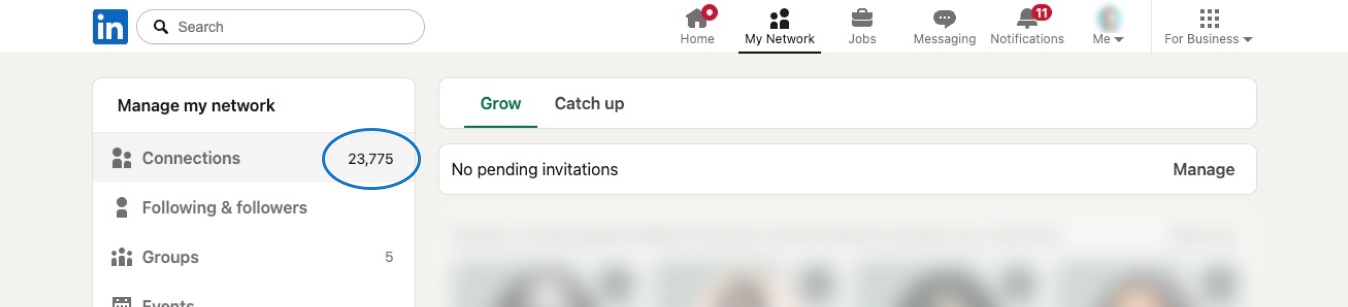
Where to find your network size
Open linkedin.com/mynetwork/grow and look for the number shown below:
Inbox
- Browse all your conversations, instantly
- Reply in the real LinkedIn thread, clean and distraction-free
- Filter by unread, starred
- Tags
- Auto-detects engagement in each conversation you open
- 100% privacy. Your messages are stored on your computer. No cloud, no servers
↑ free, then ↓
$14/month
Subscription, cancel anytime.
- Filter by whose turn it is to reply, yours or theirs
- Filter by engagement, focus on who you've actually talked to
- Auto-detect engagement on 40 conversations in one click
- Filter by tag
- Tell us what you need next, we ship fast
Install and explore, free
No signup, no credit card.
Need a license for several accounts?
You're an agency or a team and don't want to buy account by account. We issue a license key: one key, one bill. Each account unlocks itself with the key, up to the number of accounts you buy.
Tell us how many accounts you need, and whether it's network cleanup, the Inbox, or both. We'll set it up.
Talk to usFrequently asked questions
Network
What does the one-time payment include?
One payment for one LinkedIn account, no renewal, no expiry. It unlocks unlimited bulk removals and CSV export for that account, with no recurring charges. The Inbox is billed separately.
How is the price calculated?
Your price is based on your network size: $0.003 per connection, $5 minimum. The app reads your connection count automatically when you're ready to buy. Examples:
- 900 connections = $5
- 2,500 connections = $7.50
- 10,000 connections = $30
How long does it take to remove 1,000 connections?
About three days. Removals go through a queue, one at a time with varied delays to mimic human behavior, and they only run while your browser is open. Leave it open longer and you'll get through it faster. You can close the tab and keep working, and if your computer sleeps the queue picks up where it left off.
Is bulk removal safe for my LinkedIn account?
Removing a connection is an ordinary LinkedIn action with no published limit. What matters is the pace, so Network Cleaner sends one removal at a time with smart delays, and the activity never looks automated. So far that's more than 65,000 connections removed, and LinkedIn has never once rate-limited, blocked or CAPTCHA-ed one.
How we know.
How we know.
What if my network grows after I pay?
Your payment covers unlimited removals forever, regardless of how your network size changes. If you have 1,500 connections today and 5,000 next year, you don't pay again.
Do people get notified when I remove them?
No. No notification, no email, no alert. Removing someone is silent, and they would only find out by checking their own connections. If you change your mind, Network Cleaner keeps a record of everyone you've removed, so you can find them and reconnect.
More on what they can and can't see: does LinkedIn notify someone when you remove them?
More on what they can and can't see: does LinkedIn notify someone when you remove them?
Will removing a connection clean up my feed?
Mostly. Removing a connection also unfollows them, so their posts stop arriving in your feed directly. They can still show up indirectly when someone you follow reshares or comments on one.
Inbox
What does the subscription include?
$14/month for one LinkedIn account, cancel anytime. It unlocks the "your turn" and "their turn" filters, so you always know who owes whom a reply, the "back & forth" / "only you" / "only them" filters, detecting engagement automatically on 40 conversations in one click, and filtering your conversations by tag. Tagging, and the "back & forth" / "only you" / "only them" badges on each conversation, are free. We keep working on the Inbox, and everything included when you subscribe stays included for as long as your subscription is active.
Will the price go up?
Whatever price you subscribe at stays yours for as long as your subscription stays active. $14 is a launch price and it will rise for new subscribers as the Inbox grows. Subscribe now and today's price is the one you keep.
Can I cancel my subscription?
Yes, anytime. Your access runs to the end of the month you've paid for, then your account goes back to the free Inbox. Your conversations stay on your computer either way.
General
What happens after I pay?
Go back to the app and click the "Recover access" link, then enter the email you paid with. Your features unlock on that account. Team and agency licenses work the same way: enter your license key instead of your email to unlock network cleanup.
Do I need to pay for each LinkedIn account?
Yes. Both payments are tied to one LinkedIn account, so you buy once per account.
Running Network Cleaner for clients or for a team is the exception: we issue license keys instead, one key for all the accounts you need. Write to team@networkcleaner.com.
Running Network Cleaner for clients or for a team is the exception: we issue license keys instead, one key for all the accounts you need. Write to team@networkcleaner.com.
Where is my data stored?
On your computer, in your browser. Network Cleaner has no servers for your data. Your connections, your conversations, and your tags: none of it is uploaded anywhere.
What's your refund policy?
A full refund within 7 days of any charge, one-time payment or subscription, if Network Cleaner isn't working for you.
After 7 days the one-time payment is final, and there's nothing to cancel. For the Inbox, cancel anytime to stop the next renewal, and you keep access until the end of the month you've paid for.
Email team@networkcleaner.com and we'll take care of it.
After 7 days the one-time payment is final, and there's nothing to cancel. For the Inbox, cancel anytime to stop the next renewal, and you keep access until the end of the month you've paid for.
Email team@networkcleaner.com and we'll take care of it.